Danbooru
Login Posts Comments Notes Artists Tags Pools Wiki Forum More »
Listing Upload Hot Changes Help

Search

  • Help
guro
scat
furry -rating:g

Artist

  • ? shimada fumikane 1.6k

Copyrights

  • ? world witches series 25k
  • ? ↳ luminous witches 507

Character

  • ? sylvie cariello 60

General

  • ? 1girl 7.9M
  • ? animal ears 1.6M
  • ? ass 748k
  • ? athletic leotard 2.1k
  • ? ballerina 3.0k
  • ? ballet 2.4k
  • ? ballet class clothes 619
  • ? barre 303
  • ? black leotard 102k
  • ? brown eyes 1.0M
  • ? cowboy shot 790k
  • ? fake tail 49k
  • ? glasses 475k
  • ? how to 1.7k
  • ? leg up 105k
  • ? leotard 294k
  • ? long hair 5.8M
  • ? long sleeves 2.2M
  • ? looking at viewer 4.6M
  • ? pantyhose 698k
  • ? rabbit tail 82k
  • ? red-framed eyewear 41k
  • ? sheep ears 6.7k
  • ? sheep girl 6.7k
  • ? solo 6.6M
  • ? standing 1.2M
  • ? standing on one leg 117k
  • ? tail 1.1M
  • ? twintails 1.2M
  • ? white pantyhose 84k

Meta

  • ? commentary request 5.9M
  • ? highres 7.5M
  • ? translated 633k

Information

  • ID: 6844141
  • Uploader: Hajimaruto »
  • Date: over 2 years ago
  • Approver: Hereinafter »
  • Size: 1.01 MB .jpg (1244x1480) »
  • Source: x.com/humikane/status/1704132340614893824 »
  • Rating: Sensitive
  • Score: 36
  • Favorites: 35
  • Status: Active

Options

  • Resize to window
  • View smaller
  • View original
  • Find similar
  • Download

History

  • Tags
  • Pools
  • Notes
  • Moderation
  • Commentary
This post belongs to a parent (learn more) « hide
post #6697550
post #6844141
Resized to 68% of original (view original)
sylvie cariello (world witches series and 1 more) drawn by shimada_fumikane

Artist's commentary

  • Original
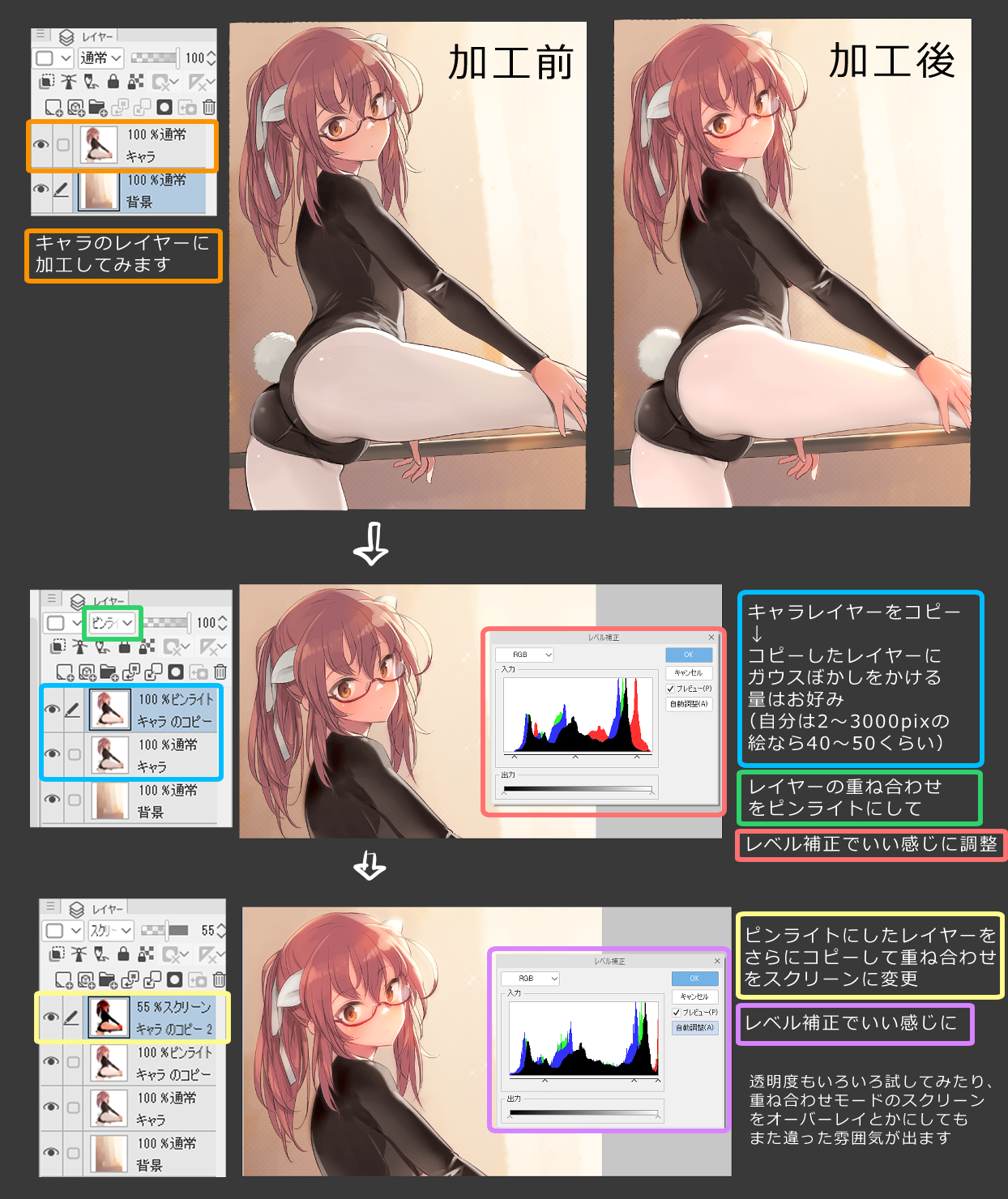
  • 最後にちょっと(数分)ひと手間でいい感じになる技です

    • ‹ prev Search: tutorial next ›
  • Comments
  • Recommended
  • Loading...

    Hajimaruto
    over 2 years ago
    [hidden]

    Translation can be found here:
    https://vxtwitter.com/Ristellise/status/1704359427758047679

    Just incase the twitter got nuked:
    https://danbooru.donmai.us/media_assets/15889682

    Updated by Hajimaruto over 2 years ago

    0 Reply
    • Copy ID
    • Copy Link

    Leave a comment

    Before Post-Processing
    After Post-Processing
    Set the layer mode to "pin light"available on CSP, SAI, Krita, & Photoshop
    First, duplicate the layer with the character
    Experiment with various levels of transparency or changing the "Screen" to "Overlay" mode to create different atmospheres
    Copy the character to a new layer ↓ Apply Gaussian blur to taste (I usually apply a 40-50px blur if my image is 2000-3000px)
    Adjust the levels for the character to taste
    Duplicate the "pin light" layer and change the duplicated layer mode to "screen"
    Adjust the levels until satisfied
    Terms / Privacy / Upgrade / Contact /