Danbooru
Login Posts Comments Notes Artists Tags Pools Wiki Forum More »
Listing Upload Hot Changes Help

Search

  • Help
guro
scat
furry -rating:g

Artist

  • ? shimejinameko 507

General

  • ? 1girl 7.9M
  • ? ass 748k
  • ? ass focus 41k
  • ? black panties 172k
  • ? black thighhighs 480k
  • ? brown panties 2.0k
  • ? checkered clothes 26k
  • ? checkered panties 207
  • ? how to 1.7k
  • ? multicolored panties 491
  • ? multiple views 248k
  • ? panties 784k
  • ? plaid clothes 182k
  • ? plaid panties 1.6k
  • ? polka dot 78k
  • ? polka dot panties 8.1k
  • ? red panties 18k
  • ? thighhighs 1.5M
  • ? underwear 971k
  • ? white panties 231k
  • ? yellow panties 7.1k

Meta

  • ? bad id 1.4M
  • ? ↳ bad pixiv id 1.1M
  • ? copyright request 120k
  • ? photoshop (medium) 709k
  • ? translation request 780k
  • ? ↳ check translation 42k

Information

  • ID: 640806
  • Uploader: MaullarMaullar »
  • Date: about 16 years ago
  • Approver: Shinjidude »
  • Size: 280 KB .jpg (667x800) »
  • Source: pixiv.net/artworks/9509731 »
  • Rating: Questionable
  • Score: 13
  • Favorites: 44
  • Status: Active

Options

  • Resize to window
  • Find similar
  • Download

History

  • Tags
  • Pools
  • Notes
  • Moderation
  • Commentary
This post belongs to a parent (learn more) « hide
post #2877058
post #640806
drawn by shimejinameko
  • ‹ prev Search: tutorial next ›
  • « ‹ prev Pool: How to Draw Panties - Guide by Cauliflower next › »
  • « ‹ prev Pool: Juicy Details next › »
  • Comments
  • Recommended
  • Loading...

    xxegoxx
    about 16 years ago
    [hidden]

    O.O

    -1 Reply
    • Copy ID
    • Copy Link
    Nilix
    about 16 years ago
    [hidden]

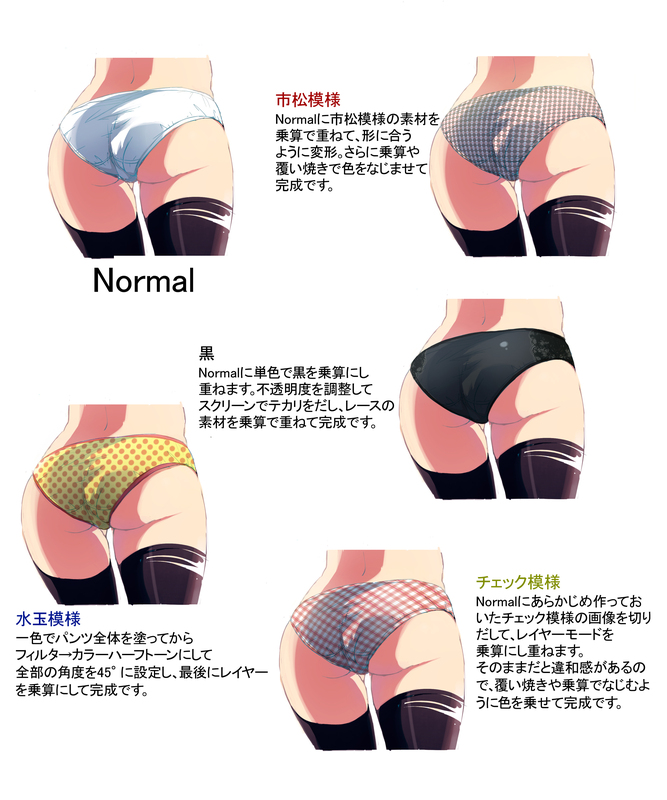
    How to draw textured panties. Vol 1

    0 Reply
    • Copy ID
    • Copy Link
    NuclearArbitor
    about 16 years ago
    [hidden]

    based off this picture:
    1) draw ass (with thighhigs)
    2) draw flat color pantie outline on new layer
    3) draw crease lines on new layer; insure color is appropriate to pantie color
    4) make shading mask on new layer
    5) draw design on panties on new layer below shading and crease layers.

    0 Reply
    • Copy ID
    • Copy Link

    Leave a comment

    Check Pattern I pull out a check pattern image made in advance over the "Normal" base, and blend it with Layer Modes. If it's left like that, it feels uncomfortable, so use the Dodge tool and Layer Multiplication to adjust the color until done.
    Checkered Pattern I add the checker pattern over the "Normal" pantsu here with a multiplication layer, adjusted to fit the shape of the pantsu. I use Dodge (See note below) to finish off the color until it looks right. TL: I'm assuming 覆い焼き is "Dodge" or "Smart Dodge" based on the best guess of a non-Japanese speaking acquaintance with some Photoshop knowledge. Perhaps it could be "Burn"?
    Polka-dot Pattern First, I make the pantsu in just a single color, then go to Filter -> Halftone Pattern and set everything to an angle of 45°. Finish off by setting to multiplication. TL: I truly have no clue what these elements of Photoshop are. Hopefully you can make sense of it. "Halftone Pattern" was originally Color Half Tone, and changed on a recommendation by a commenter.
    Black I added this monochromatic black onto the "Normal" base with a multiplication layer. I adjusted the opacity level and put in the wrinkles to act as a "screen", and finished off by adding the lace material with a multiplication layer.
    Terms / Privacy / Upgrade / Contact /